Accounts Transactions
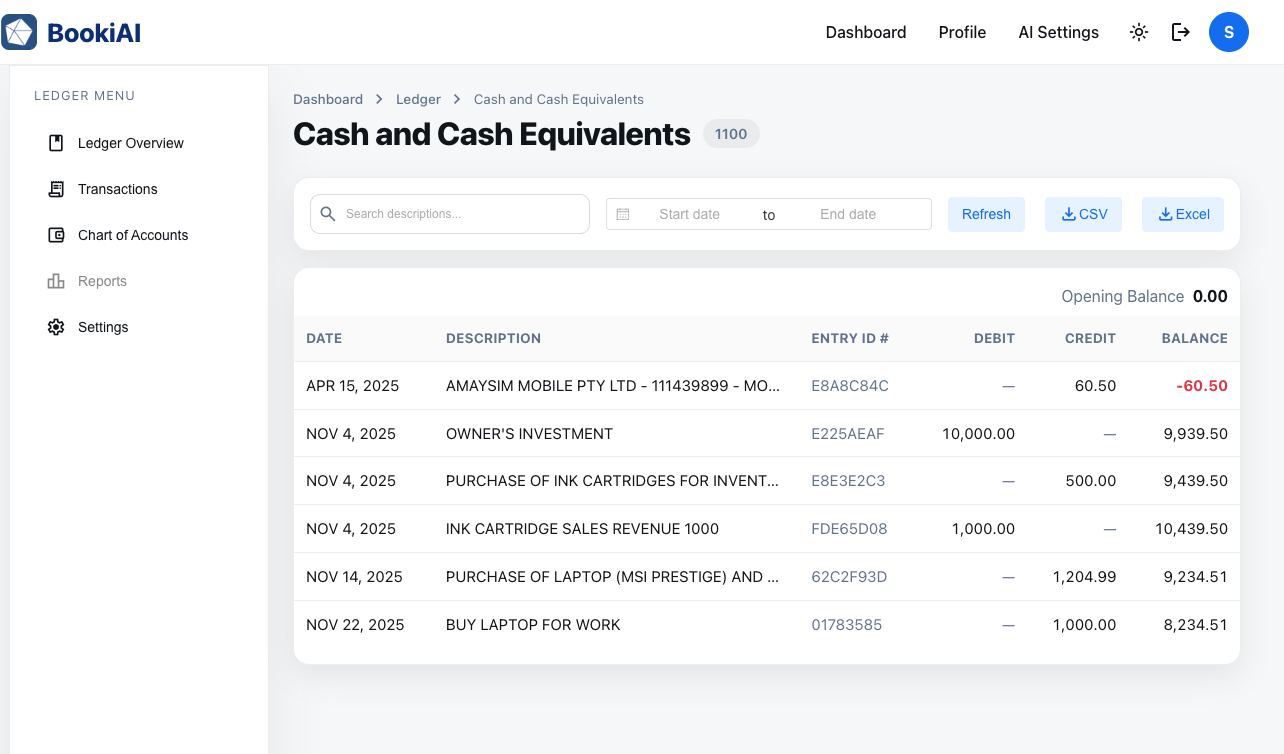
Track every entry for a chosen account, filter quickly, and open attachments without leaving the page.
1. What this page is for
- A focused view to see all journal entries tied to one account with balances and supporting files.
- Lets you validate reconciliations, find outliers, and prepare for close or audit.
2. Header and account context
- Access from the chart or dashboard card; the header shows code, name, account type, and current balance.
- Quick actions to copy the account code or jump back to the chart.
3. List view and filters
- Transactions grouped by date with reference, description, debit/credit, attachment indicator, and reconciliation status.
- Filters: date range, source document, status (posted/draft), tags; search by reference or counterparty.
4. Transaction detail
- Clicking a row takes you to the Journal Entry detail view for the selected transaction.
- Review full line breakdown and attachments there, and add audit notes as needed.
5. Next steps
- Ready to create new entries? Return to Ledger Journal Entries.